
How to Verify Hotel Amenities Before You Book
The fastest way to verify hotel amenities is to open the specific room’s “more details” or “room information” panel on the booking page, not the property’s general amenities list, and get anything essential confirmed in writing by the hotel directly. That single move catches most mismatches before they cost you a ruined trip.
Two more checks take five extra minutes and save real headaches:
- Skim recent guest reviews for mentions of the amenity being closed, broken, or removed.
- Read the fine print on the booking page for seasonal closures, resort fees, or “subject to availability” language.
Budget 10 to 15 minutes total for a standard check, longer if the amenity is a dealbreaker like a private in-room jacuzzi. None of this guarantees perfection, but it eliminates the vast majority of surprise-at-checkin scenarios.
Key Takeaways
Verifying hotel amenities comes down to checking room-level details, cross-referencing recent reviews, and securing written confirmation for anything non-negotiable.
| Point | Details |
|---|---|
| Check room-level details first | Open the specific room’s “more details” panel instead of trusting the property’s general amenities list. |
| Cross-check recent reviews | Recent reviews reveal closures or changes that listings may not yet reflect. |
| Know guaranteed vs. requested | Guaranteed features are selected at booking and tied to room type; requests can be declined later. |
| Get it in writing | Email confirmation or a reservation note protects you far better than a verbal promise from an agent. |
| Use a verified directory for jacuzzis | Hotelhottubs checks in-room jacuzzi listings at the room level with verified photos, cutting out the manual legwork for that specific amenity. |
Table of Contents
- How do you verify hotel amenities before booking?
- Where online can you check hotel facilities?
- What’s the script for confirming an amenity directly?
- What are the red flags and when should you pause?
- How does Hotel Hot Tubs verify in-room jacuzzis?
- Where should you look when a private jacuzzi is the whole point of the trip?
- Sources
How do you verify hotel amenities before booking?
Run this sequence every time you book, in this order:
- Filter first, then click into the room. Use amenity filters on the booking site, then open the exact room type’s “more details” dropdown inside the pricing card. That’s where room-specific items like a jetted tub or mini-fridge actually live, not in the property’s aggregated list up top.
- Check reviews dated within the last two months. Older reviews describe a hotel that may have already changed. A pool marked “open” in the listing but called “closed for renovation” in a review from three weeks ago tells you which one to believe.
- Read the policy or fine-print section. Look for resort fees, seasonal shutdowns, or notes that an amenity is available “upon request only.”
- Get it in writing if it’s non-negotiable. For anything you’re not willing to lose, request confirmation before you pay, not after.
Pro Tip: Screenshot the room details page at the moment you book. Listings change, and a dated screenshot is stronger evidence than your memory when you’re arguing a refund at the front desk.
This sequence works because it moves from cheapest check to most reliable one. Filters and room details cost nothing. Written confirmation costs a five-minute email, but it’s the only step that actually holds a hotel accountable.
Where online can you check hotel facilities?
Not all amenity listings carry equal weight, and knowing which one to trust changes the whole exercise.
The room pricing card is the authoritative source for what a specific room configuration includes. Most major booking sites and hotel-direct sites tuck a “more details” or “room information” link inside each room’s rate card. That’s where you’ll find whether this room has the soaking tub, not just whether the property has one somewhere on-site. Marriott’s own guidance points guests to filter options above the room list specifically to isolate guaranteed features from general property amenities.
Property-wide amenities sections, by contrast, are marketing summaries. A hotel might list “hot tub” once at the top of its page even though only three of forty rooms actually have one. Treat that section as a hint, never a guarantee.
A few structured signals help you cross-check:
- A hotel’s Google Business Profile reflects amenities the property itself edited, since only a verified profile owner can change that data, but updates can lag reality by weeks.
- Some booking platforms pull amenity data from structured facility feeds, similar to how Booking.com-style facility APIs return grouped facility categories with a metadata timestamp showing exactly when that data was last scraped. If a listing tool exposes that timestamp, an amenity flagged more than a few months ago deserves a second look.
- Watch for a “guaranteed feature” filter where it exists. That label carries more weight than a checkbox buried in a general list.
What’s the script for confirming an amenity directly?
When the room-level details and reviews leave you unsure, contact the hotel. Channel choice matters.
Chat or a quick phone call works for simple yes/no questions and usually gets you an answer in minutes. Email is slower, often a day or two, but it creates a paper trail automatically, which makes it the better choice for anything you’d need to prove later.
- Call first for speed. Ask: “I’m booking [room type] for [dates]. Can you confirm this specific room has [amenity], and can you add a note to my reservation confirming it?” Get the agent’s name and the time of the call.
- Follow up by email for a paper trail. A short template: “Hi, I’m reserving [room type/code] for [check-in date]. Please confirm in writing that this room includes [amenity] and add it as a note to reservation #[number].” Keep it under four sentences.
- Ask for specifics, not reassurance. Request the room type code, a reservation note, and the agent’s name and timestamp. A vague “yes, we have that” from a phone rep means nothing if the front desk has no record of it.
- Save everything. Screenshot the confirmation email or chat log and keep it accessible on your phone for check-in.
Pro Tip: If an agent can’t add a note to your reservation, that’s information too. It usually means the amenity isn’t tracked as guaranteed in their system, which is common with property management platforms like Oracle OPERA, where some room features aren’t inventory-tracked unless they affect rate or availability. Push for a room type that lists the feature explicitly instead of accepting a verbal promise.
A verbal “sure, we can probably do that” is a request, not a guarantee, and Marriott’s own help documentation draws that exact line: guaranteed features are selected and locked in at booking, tied to room type; anything added afterward is a request the hotel can decline.
What are the red flags and when should you pause?
Some warning signs mean stop and verify before paying. Others mean proceed with a quick note to yourself.
Watch for these:
- A generic amenity checkbox with zero detail (just “spa” with no mention of hours, access, or room-level availability).
- The OTA listing and the hotel’s own website disagree on whether an amenity exists.
- Multiple reviews within the past month mention the amenity being closed, under repair, or “not as advertised.”
If you spot any of these and the amenity is a dealbreaker, pause and get written confirmation before booking. If it’s a nice-to-have, book anyway and verify closer to arrival.
Run a three-touch verification timeline: once at booking, again 7 to 14 days before arrival, and once more 24 to 48 hours before check-in, when hotels are most responsive to same-week questions. If you arrive and the promised amenity is missing, document it immediately: photograph the room, note the time, and ask the front desk to log the discrepancy in writing before you leave the property. That record is what makes a refund claim or chargeback actually stick.
How does Hotel Hot Tubs verify in-room jacuzzis?
For one amenity category, general verification steps aren’t enough: a private in-room jacuzzi is either there or it isn’t, and OTA filters routinely surface rooms with shared spa access instead of the real thing. Hotelhottubs exists specifically to close that gap.
- Every listing is checked at the room level, not the property level, so “jacuzzi” means an actual in-room tub, not a lobby hot tub down the hall.
- Listings include verified photos and guest feedback tied to the specific room type, giving you evidence beyond a hotel’s own marketing copy.
- If you’re deciding between in-room jacuzzi hotels for a romantic getaway, starting with a verified directory skips several of the manual checks above entirely.
When the amenity is non-negotiable, this is the lowest-effort route: filter by city, confirm the photos match the room type, and book.
A quick note from someone who has chased down a lot of these
Years of tracking hotel amenity mismatches taught me one thing: hotels rarely lie outright, they just let outdated listings sit. The checklist above works because it targets that gap, not dishonesty.
Where should you look when a private jacuzzi is the whole point of the trip?
Everything above works for verifying most amenities: pools, gyms, breakfast, parking. But a private in-room jacuzzi carries higher stakes than a missing waffle maker, since it’s often the entire reason for the trip, and generic OTA filters mislabel shared spa access as an in-room amenity more often than travelers expect.
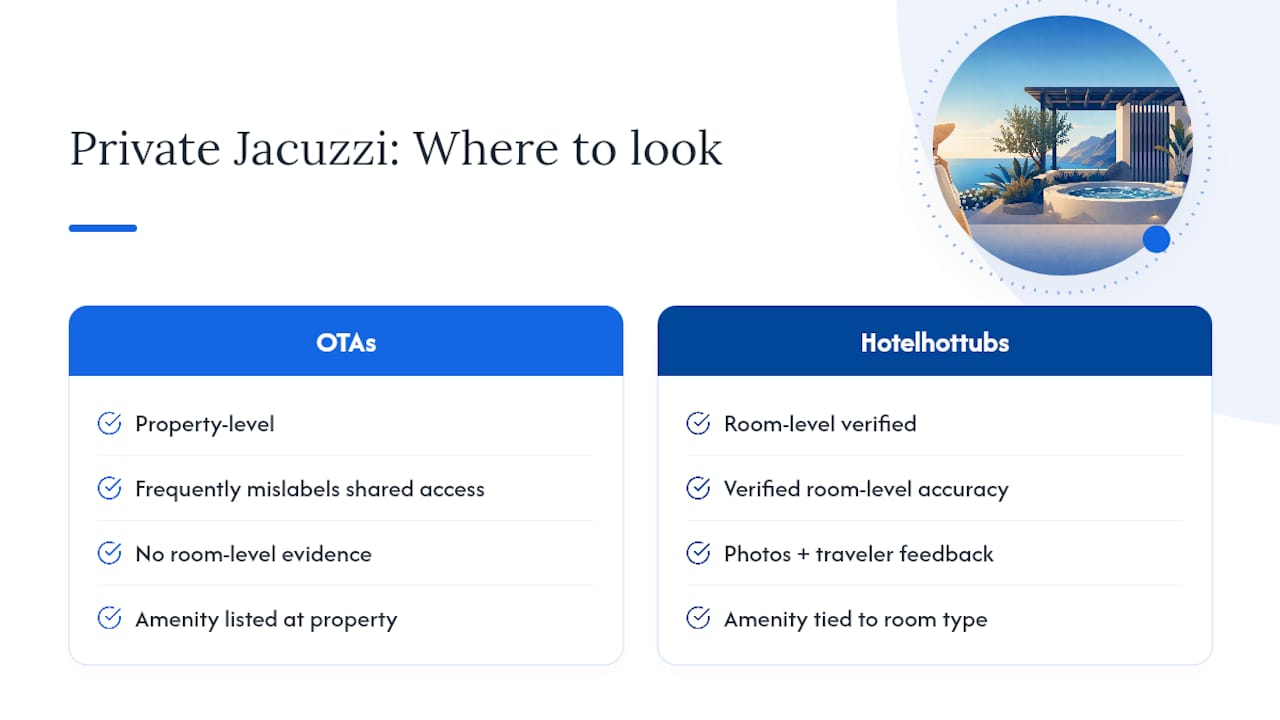
Hotelhottubs built its entire directory around solving exactly that problem. Every listing gets checked at the room level, with verified photos and traveler feedback attached to the specific room type, not the property in general, so you skip the “more details” hunting and phone scripts covered earlier. If you understand the difference between a jacuzzi and a hot tub and want a stay where that distinction is already confirmed for you, browse hotel suites with a jacuzzi in the room and filter by city, price, or trip type. Every listing on that page has already been through the verification work this article just walked you through.
Sources
- StayAPI — Booking hotel facilities endpoint (example)
- Configuring room features — Oracle OPERA Cloud (23.4)